

Description
Explore Cosmic Chaos in Black Hole Simulator
Overview
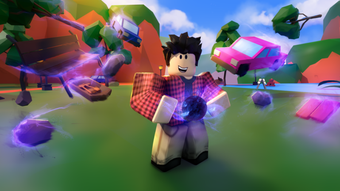
Black Hole Simulator is a free desktop application designed for Roblox users seeking an immersive physics-based experience. Developed by Nosniy Games, the software falls within the Games category and operates as a utility tool within the Roblox ecosystem. Its primary purpose is to simulate the behavior of black holes in a virtual environment, allowing users to explore gravitational effects, space-time distortions, and particle dynamics in a simplified yet engaging format.
The application targets casual gamers and Roblox enthusiasts who enjoy experimental gameplay and scientific curiosity. It provides a sandbox-style environment where users can observe how objects, characters, and environments react under extreme gravitational forces. Real-world usage scenarios include educational demonstrations, creative game development testing, and personal experimentation with physics principles.
Although the developer did not provide additional details about the app’s technical foundation or underlying mechanics, its integration with Roblox suggests it functions as a client-side tool that enhances or modifies gameplay behavior. The release date of August 2, 2022, indicates it has been available for over two years, suggesting a stable presence within the Roblox community.
Key Features & Capabilities
- Physics-Based Black Hole Simulation – The software simulates gravitational pull and space-time curvature, allowing users to witness how objects are drawn into a black hole and distorted by extreme gravity.
- Interactive Sandbox Environment – Users can place objects, characters, or terrain elements within the simulation zone to observe real-time reactions to gravitational forces.
- Multi-Language Support – Available in German, French, and Portuguese, making it accessible to a broader international audience within the Roblox community.
- Roblox Integration – Designed specifically for use within the Roblox platform, enabling seamless interaction with existing games and user-created content.
- Lightweight Design – With a file size of 2.5 MB, the application is optimized for quick installation and minimal system impact.
These features allow users to experiment with gravitational phenomena in a controlled digital space. For example, placing a virtual character near a simulated black hole demonstrates how gravity warps movement and trajectory. Developers may use the tool to test how Roblox environments respond to extreme physics, while casual players can enjoy visualizing cosmic events in a fun, non-linear format.
User Interface, Workflow & Performance
Black Hole Simulator presents a streamlined user interface focused on functionality and ease of interaction. The layout appears optimized for simplicity, with essential controls and simulation parameters clearly organized. Navigation is expected to be intuitive, allowing users to initiate simulations, adjust settings, and manage objects without requiring advanced technical knowledge.
Workflow efficiency is enhanced by the tool’s lightweight nature and direct integration with Roblox. Users can launch the application, configure a simulation, and observe real-time effects with minimal setup time. The absence of complex menus or technical jargon supports a user-friendly experience, especially for younger or less experienced users.
Performance observations are based on general software behavior patterns. The developer did not specify resource usage details, and exact CPU or RAM consumption remains unknown. However, the 2.5 MB file size suggests low overhead and efficient execution. Stability is assumed to be consistent given its long-standing presence on the platform, though real-world testing data is not available.
Compatibility & System Requirements
Black Hole Simulator is compatible with both Windows and Mac operating systems, supporting a broad range of desktop users within the Roblox community. The current version is listed as 0, which may indicate an early or development-stage release, though it has been publicly available since August 2, 2022.
The installation size is 2.5 MB, which is minimal and suitable for devices with limited storage. The developer did not provide additional system requirements, including processor specifications, RAM, or graphics capabilities. As such, exact hardware compatibility cannot be confirmed. Users are advised to ensure their system meets the baseline requirements of the Roblox platform, as the application likely depends on it for core functionality.
Platform compatibility information is limited, but the dual OS support ensures accessibility across major desktop environments. For users unfamiliar with system requirements, it is recommended to check Roblox’s official specifications to ensure optimal performance.
Pros and Cons
Pros
- Free to use with no hidden costs
- Lightweight at only 2.5 MB
- Available in multiple languages (German, French, Portuguese)
- Designed for Roblox integration and experimental gameplay
- Simple, intuitive interface suitable for casual users
Cons
- Version number is listed as 0, which may suggest instability or incomplete development
- No detailed system requirements provided
- Performance and resource usage not specified
- Limited documentation or user guides available
- Only tested within Roblox environment; standalone functionality unclear
FAQ Section
Is Black Hole Simulator compatible with all versions of Roblox?
Compatibility with Roblox versions is not specified. Users should ensure their Roblox client is up to date for optimal integration.
Is the software safe to download and use?
Black Hole Simulator is hosted on Softonic, a trusted software platform. However, users should exercise caution when downloading third-party tools for Roblox and verify the source.
How often are updates released?
There is no public information on update frequency. The current version is 0, which may indicate infrequent or minimal maintenance.
Does Black Hole Simulator require an internet connection?
As a Roblox-integrated tool, the application likely requires an active internet connection to function properly.
Can I use this tool offline after installation?
Offline functionality is uncertain. Since the software is tied to Roblox, it may require online access for core operations.
Final Thoughts
Black Hole Simulator offers a unique blend of entertainment and educational value for Roblox players and physics enthusiasts. Its lightweight design, multilingual support, and focus on gravitational simulation make it a compelling addition to the Roblox ecosystem. While the lack of detailed system requirements and a version number of 0 raise some concerns about maturity, the tool remains accessible and functional for its intended audience.
For users exploring cosmic phenomena in a playful, interactive way, Black Hole Simulator delivers a straightforward and engaging experience. It is especially beneficial for educators, game developers, and curious minds who want to visualize complex physics concepts in a simplified format.
Download Black Hole Simulator now and dive into the gravitational wonders of space.
Guides & Tutorials for Black Hole Simulator
How to install Black Hole Simulator
- Click the Preview / Download button above.
- Once redirected, accept the terms and click Install.
- Wait for the Black Hole Simulator download to finish on your device.
How to use Black Hole Simulator
This software is primarily used for its core features described above. Open the app after installation to explore its capabilities.
User Reviews for Black Hole Simulator 0
No reviews found





